Ransomware Explained: How It Works and How to Protect Your Files
November 20, 2026
Ransomware is one of the most feared cyber threats, and for good reason. One wrong click is all it takes for your documents, family photos and work files to become unreadable. Then a message appears: if you want them back, you have to pay. You don’t need to be a tech expert to understand it, and you certainly don’t need to be one to defend yourself. In this guide, updated November 2026, I explain how ransomware works, how it gets onto your devices, and what to do before and after an attack.
What Is Ransomware? A Simple Explanation
Ransomware is malicious software that encrypts your files. Encrypting means scrambling them with a secret code: the files stay on your device, but you can no longer open them. Only someone with the right key can unlock them.
Criminals demand a ransom, usually in cryptocurrency, in exchange for that key. Often they add a second threat: before encrypting, they copy your data. Then they warn that they will publish it online if you don’t pay.
Think of a thief who locks your documents in a safe that only they can open. And who also makes a copy to show to everyone else.
How Ransomware Gets Onto Your Device
Ransomware rarely “breaks down the door.” Usually it tricks you into opening it, or it finds a door that was already left ajar. These are the most common routes:
- Email attachments: a fake invoice, a fake delivery notice, an “urgent” file you’re told to open right away.
- Fake updates: a warning telling you to update your browser or a program, but it makes you download an infected file.
- Cracked software: pirated programs or games that hide malicious code alongside the “crack.”
- Remote access with weak passwords: if you leave remote desktop switched on with an easy password, criminals will try to break in from outside.
- USB drives: a drive you found or borrowed can carry infected files.
- Links in messages and texts: a link received via WhatsApp, Facebook or Instagram can lead to sites that download dangerous programs.
Scams are also more convincing today because criminals use artificial intelligence tools to write believable messages with no mistakes. To learn how to spot them, read our guide to AI-powered scams.
Who Gets Hit by Ransomware
Thinking “it won’t happen to me, I have nothing interesting” is a mistake. Attacks are often automated: they go out in bulk and hit anyone who bites.
- Individuals: you lose photos, videos, personal documents and paperwork you haven’t copied elsewhere.
- Professionals: lawyers, doctors, accountants and freelancers hold client and patient data, which is very valuable.
- Small businesses: they have fewer protections than big corporations but depend on their data to operate. Even a few days of downtime can be costly.
For criminals, people who are short on time and light on defenses make an ideal target.
3-2-1 Backups: Your Insurance Against Ransomware
If you have a safe copy of your files, the blackmail loses most of its power. Backup is your most important defense, and the rule to follow is called 3-2-1:
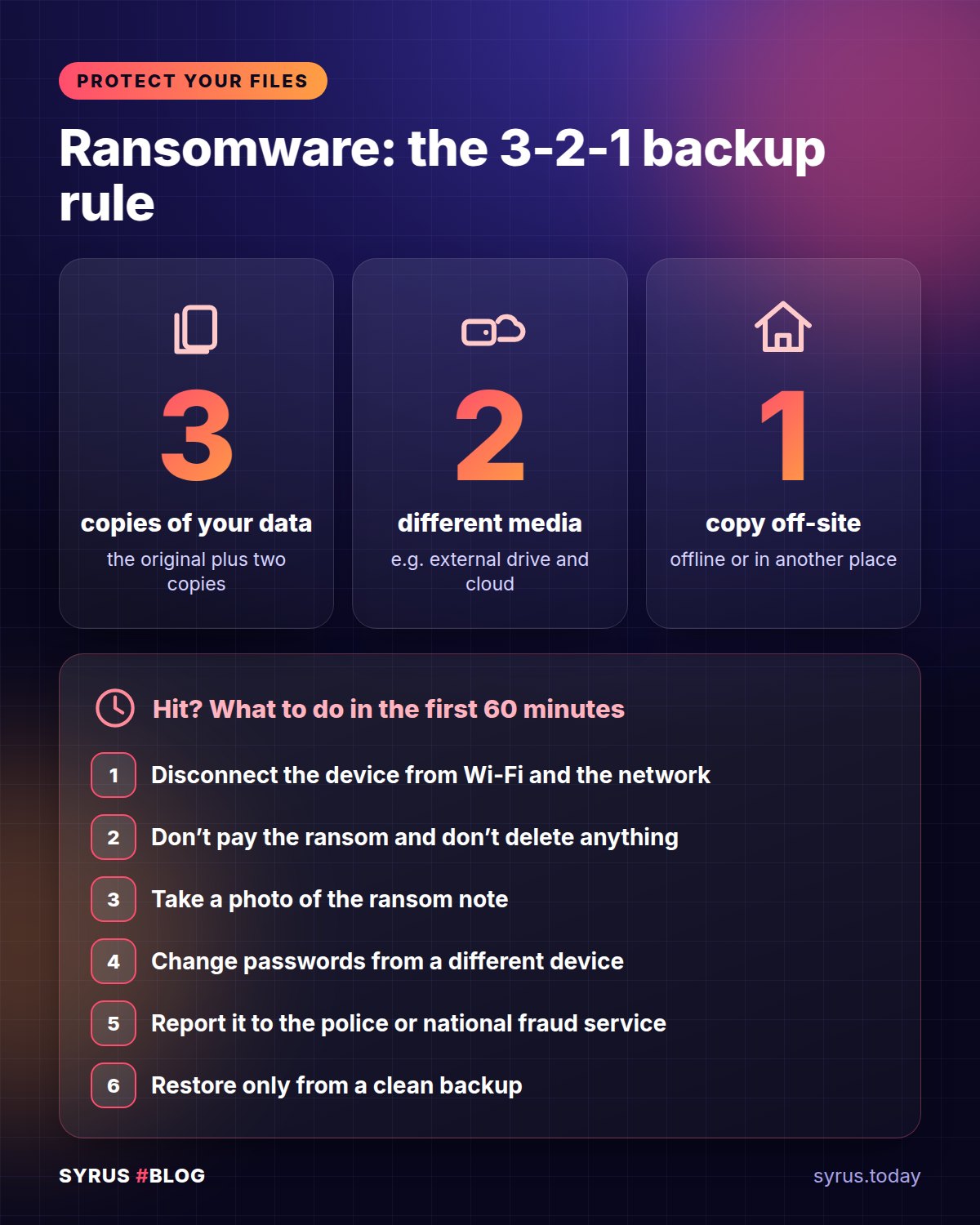
- 3 copies of your data: the original and two backups.
- 2 different types of storage: for example your computer and an external drive, or an external drive and a cloud service.
- 1 copy offsite or disconnected: kept away from your computer.
Here is a point many people underestimate. If your backup drive stays plugged in all the time, ransomware can encrypt that too. That’s why at least one copy should be disconnected after use, or immutable. Immutable means that once saved, it can’t be changed or deleted for a set period. Some cloud services offer this feature.
Then there’s the most common mistake: never testing a restore. A backup you’ve never tested is a hope, not a guarantee. Every so often, try recovering a few files and check that they actually open.
Everyday Habits That Protect You
Besides backups, a few simple rules are enough, as long as you apply them consistently:
- Turn on automatic updates for your system, browser and apps. Many attacks exploit flaws that have already been fixed.
- Keep antivirus protection on. The one built into your operating system is fine, as long as it’s switched on and up to date.
- Use a non-administrator account for everyday work. If malware starts from there, it has less power to do damage.
- Turn on two-factor authentication (2FA) for email, cloud, social media and important services. Even if they steal your password, they can’t get in.
- Use long, unique passwords for every service, with the help of a password manager.
- Disable remote access if you don’t need it. If you do use it, protect it with a strong password and 2FA.
Attachments, Links and Pirated Software: Where to Be Careful
This is where you make the difference. Before opening an attachment, pause for a second and ask yourself:
- Was I actually expecting this message?
- Is the sender really who they claim to be? Check the full address, not just the display name.
- Does the tone create urgency or fear? That’s a classic sign of a scam.
- Does the file ask you to “enable macros” or run something? Don’t.
Download updates only from your system settings or official websites, never from a pop-up that appears while you’re browsing.
Also be wary of pirated software. The savings are only apparent: cracked software can cost you all your data. And to install it, you’re often asked to turn off your antivirus, in other words, to switch off your own defense.
If a virus of any kind has already made you suspicious, check your smartphone too: our guide to finding out whether your phone is being spied on can help.
What to Do If Ransomware Hits You
Stay calm. Acting in an orderly way limits the damage. Here are the steps, in order:
- Disconnect the device from the network right away: unplug the cable, turn off Wi-Fi. That way the malware can’t spread to other computers and drives.
- Isolate it, don’t just shut it off at random. Powering off abruptly can destroy useful traces. If you’re at work, tell your IT team before acting. Also unplug external drives and USB sticks.
- Photograph the ransom note with your smartphone. You’ll need the text, the file name and any addresses listed.
- Don’t pay. There is no guarantee you’ll receive the key, and by paying you fund more attacks. You also mark yourself as a reliable payer.
- Look for official free decryption tools. For some ransomware families, tools have been made available by law enforcement and international anti-crime initiatives. Use official sites only, and distrust anyone selling miracle “unlockers.”
- Restore from backups, but only after cleaning the device. It’s better to reinstall the system from scratch, so you don’t bring the malware back in.
- Change your passwords for email and important services, from a clean device.
- Report the incident. In the US, report it to the FTC at reportfraud.ftc.gov. In the UK, report it to Action Fraud (actionfraud.police.uk). In both cases, also contact your local police.
If You Run a Business: Personal Data and Legal Duties
If you’re a professional or run a company, there’s an extra consideration. If the attack involved personal data belonging to clients, patients or employees, data protection law may require you to report the incident to the relevant authority. In some cases you must also notify the people affected.
Deadlines are tight, so don’t wait. Write down what happened, when you found out and which data may be involved. Then bring in a consultant or your data protection officer right away, if you have one. Preparing an emergency plan in advance, with the right contacts, saves you precious hours.
Frequently Asked Questions
Is antivirus enough to stop ransomware?
No. It’s an important layer of protection, but not the only one. No antivirus catches everything. You also need updates, caution with attachments and, above all, secure backups.
If I pay, will I really get my files back?
Not necessarily. Some criminals never send the key, and others send one that doesn’t work properly. And there’s no certainty that the copied data won’t be leaked anyway. That’s why it’s better not to pay.
Can Macs and smartphones be hit too?
Yes. The risk is higher on Windows computers, but no device is immune. The same rules apply on Macs and phones: updates, apps only from official sources, and backups.
The Bottom Line
Ransomware encrypts your files and blackmails you, often threatening to publish your data. It gets in mostly through a moment of distraction: attachments, fake updates, pirated software and weak remote access. The best defenses are simple: 3-2-1 backups with one disconnected or immutable copy, automatic updates, 2FA and a healthy dose of suspicion. If you’re hit, isolate the device, don’t pay, keep the evidence and ask for help. Get prepared today: tomorrow may be too late.